Anyone used any tooling to count how many lines of .script code you have
If had to be per suite that would be ok but trying to see how many we have per project/git repo
I know about
git ls-files ‘*.script’ | xargs wc -l
The issue here is doesnt work with file names with certain symbols or spaces in the name (that another discussion with my team)
I also tried using cloc but I cant get it to work with .script files just other languages
I also tend to lean on the command-line, but if you want something to run in EPF I came up with a script you can run and generate a “lines of code” report in Output that ignores commented lines/blocks. You can customize, of course:
To scan the entire suite tree rather than only its Scripts folder, replace:
collectScriptFiles scriptsFolder
with:
collectScriptFiles suiteFolder
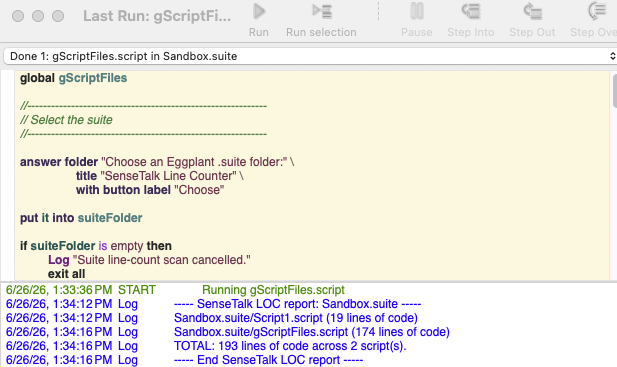
Here is how it runs currently:
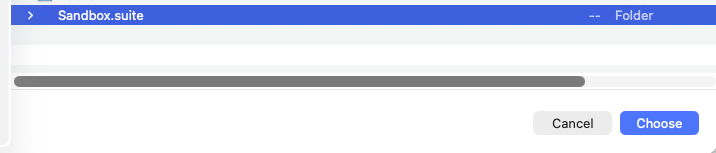
Pop-up to choose the .suite you want to get lines of code for:
Code (does the job, but I haven’t had time to fix some of the warnings :
global gScriptFiles

//------------------------------------------------------------
// Select the suite
//------------------------------------------------------------

answer folder "Choose an Eggplant .suite folder:" \
		title "SenseTalk Line Counter" \
		with button label "Choose"

put it into suiteFolder

if suiteFolder is empty then
	Log "Suite line-count scan cancelled."
	exit all
end if

put lastPathComponent(suiteFolder) into suiteName

if fileExtension(suiteName) is not "suite" then
	answer "Please select a folder whose name ends in .suite."
	exit all
end if


//------------------------------------------------------------
// Build the path to <suite>/Scripts
//------------------------------------------------------------

put pathList(suiteFolder) into scriptsPathParts
insert "Scripts" after scriptsPathParts
put filePath(scriptsPathParts) into scriptsFolder

if there is not a folder scriptsFolder then
	LogWarning "No Scripts folder was found in " & suiteName
	exit all
end if


//------------------------------------------------------------
// Find every .script file, including nested folders
//------------------------------------------------------------

put [] into gScriptFiles
collectScriptFiles scriptsFolder

if gScriptFiles is empty then
	LogWarning "No .script files were found in " & scriptsFolder
	exit all
end if


//------------------------------------------------------------
// Count and report
//------------------------------------------------------------

put 0 into suiteTotal

Log "----- SenseTalk LOC report: " & suiteName & " -----"

repeat with each item scriptPath of gScriptFiles
	put countCodeLines(scriptPath) into lineCount
	add lineCount to suiteTotal

	put scriptNameRelativeTo(scriptPath, scriptsFolder) into relativeName

	Log suiteName & "/" & relativeName && \
			"(" & lineCount && "lines of code)"
end repeat

put the number of items of gScriptFiles into scriptCount

Log "TOTAL:" && suiteTotal && \
		"lines of code across" && scriptCount && "script(s)."

Log "----- End SenseTalk LOC report -----"


//============================================================
// Recursively collect all .script files
//============================================================

to collectScriptFiles currentFolder
	global gScriptFiles

	repeat with each item fileInfo of files(currentFolder)
		if fileExtension(fileInfo) is "script" then
			put the long name of fileInfo into fullPath
			insert fullPath after gScriptFiles
		end if
	end repeat

	repeat with each item folderInfo of folders(currentFolder)
		put the long name of folderInfo into childFolder
		collectScriptFiles childFolder
	end repeat
end collectScriptFiles


//============================================================
// Count physical lines containing source code
//
// A line is counted when something other than whitespace
// remains after comments have been removed.
//============================================================

function countCodeLines scriptPath
	put file scriptPath into sourceText

	put 0 into lineCount
	put 0 into blockCommentDepth
	put empty into quoteEnd

	repeat with each line sourceLine of sourceText
		put removeCommentsFromLine( \
		sourceLine, blockCommentDepth, quoteEnd) into scanResult

		put scanResult.blockDepth into blockCommentDepth
		put scanResult.quoteEnd into quoteEnd

		if trim(scanResult.code) is not empty then
			add 1 to lineCount
		end if
	end repeat

	return lineCount
end countCodeLines


//============================================================
// Remove comments while preserving quoted text.
//
// Recognizes:
//
//   -- line comments
//   // line comments
//   —  em-dash line comments
//   (* nested block comments *)
//
// It also tracks common SenseTalk quotation forms so that
// comment markers occurring inside strings are preserved.
//============================================================

function removeCommentsFromLine \
			sourceLine, startingDepth, startingQuoteEnd

	put startingDepth into blockDepth
	put startingQuoteEnd into quoteEnd

	put empty into codeText
	put false into escaped
	put 1 into characterIndex
	put the number of characters of sourceLine into characterCount

	repeat while characterIndex <= characterCount

		put character characterIndex of sourceLine into currentCharacter

		if characterIndex < characterCount then
			put characters characterIndex to \
			(characterIndex + 1) of sourceLine into characterPair
		else
			put empty into characterPair
		end if


		//--------------------------------------------------------
		// Currently inside a block comment
		//--------------------------------------------------------

		if blockDepth > 0 then
			if characterPair is "(*" then
				add 1 to blockDepth
				add 2 to characterIndex

			else if characterPair is "*)" then
				subtract 1 from blockDepth
				add 2 to characterIndex

			else
				add 1 to characterIndex
			end if

			next repeat
		end if


		//--------------------------------------------------------
		// Currently inside quoted text
		//--------------------------------------------------------

		if quoteEnd is not empty then

			// Two-character closing delimiters
			if quoteEnd is ">>" or quoteEnd is "}}" then
				if characterPair is quoteEnd then
					put characterPair after codeText
					put empty into quoteEnd
					add 2 to characterIndex
				else
					put currentCharacter after codeText
					add 1 to characterIndex
				end if

				// Ordinary double-quoted text
			else if quoteEnd is quote then
				put currentCharacter after codeText

				if currentCharacter is quote and not escaped then
					put empty into quoteEnd
				end if

				if currentCharacter is backslash and not escaped then
					put true into escaped
				else
					put false into escaped
				end if

				add 1 to characterIndex

				// Curly quotes or guillemets
			else
				put currentCharacter after codeText

				if currentCharacter is quoteEnd then
					put empty into quoteEnd
				end if

				add 1 to characterIndex
			end if

			next repeat
		end if


		//--------------------------------------------------------
		// Not currently inside a comment or quoted text
		//--------------------------------------------------------

		if characterPair is "(*" then
			add 1 to blockDepth
			add 2 to characterIndex

		else if characterPair is "--" or \
				characterPair is "//" or \
				currentCharacter is "—" then

			// The remainder of the line is a comment.
			exit repeat

			else if currentCharacter is quote then
			put quote into quoteEnd
			put currentCharacter after codeText
			put false into escaped
			add 1 to characterIndex

			else if currentCharacter is "“" then
			put "”" into quoteEnd
			put currentCharacter after codeText
			add 1 to characterIndex

			else if currentCharacter is "«" then
			put "»" into quoteEnd
			put currentCharacter after codeText
			add 1 to characterIndex

			else if characterPair is "<<" then
			put ">>" into quoteEnd
			put characterPair after codeText
			add 2 to characterIndex

			else if characterPair is "{{" then
			put "}}" into quoteEnd
			put characterPair after codeText
			add 2 to characterIndex

			else
			put currentCharacter after codeText
			add 1 to characterIndex
		end if
	end repeat

	return {
		code: codeText,
		blockDepth: blockDepth,
		quoteEnd: quoteEnd
	}
end removeCommentsFromLine


//============================================================
// Return the script's path relative to <suite>/Scripts
//============================================================

function scriptNameRelativeTo scriptPath, scriptsFolder
	put pathList(scriptPath) into scriptParts
	put pathList(scriptsFolder) into rootParts

	repeat with partNumber = 1 to the number of items of rootParts
		delete item 1 of scriptParts
	end repeat

	return filePath(scriptParts)
end scriptNameRelativeTo
Hello,
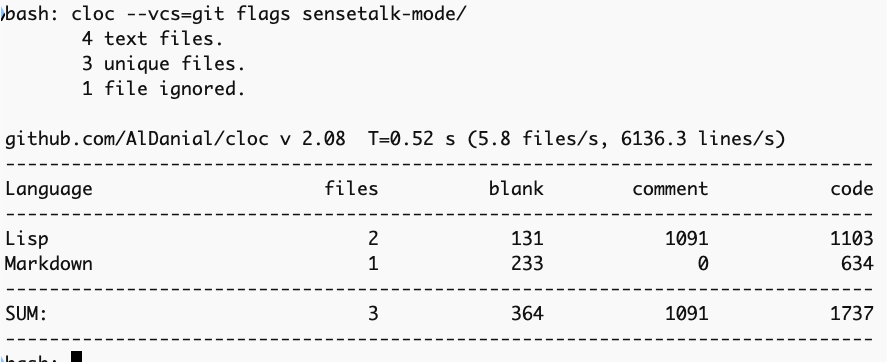
If you have a parent directory containing multiple git repositories, you can run cloc with the --by-file or --vcs=git flags, or point it directly at the subdirectories to get a clean, tabular report per project.
That’s pretty cool! I’ve never used cloc before. I have to assume it’s avoiding comments in the code since it has a column for that, but I haven’t run my Eggplant script on this repository before. Will be interesting to compare. Thanks for that!
 :
: